Sidebar
The 280 px-wide left sidebar appears on category, brand, and search pages. It shows:
- Categories tree — collapsible navigation
- Faceted filters (when filters are enabled on the category)
- Promo card (optional, text-only — driven by the Sidebar promo card setting)
- Custom widgets (optional, via Page Builder regions)
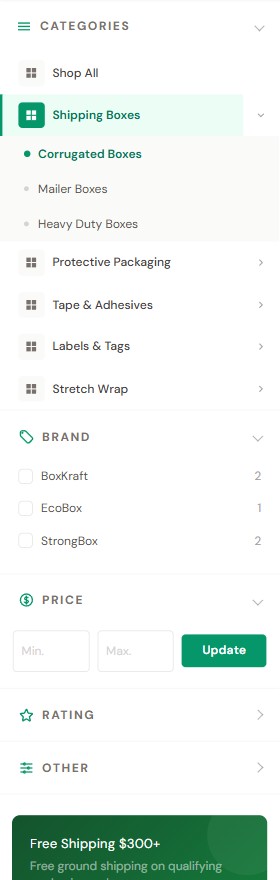
① Categories tree
The tree is built from your store's product category structure (BigCommerce admin: Products → Categories). It displays up to four levels of categories — any subcategories deeper than the fourth level are not shown in the sidebar tree.
The categories section auto-collapses whenever a filter is currently applied (to give the active filters more room), and otherwise shows the tree with the active category branch expanded. You can still expand/collapse it manually by clicking the Categories header (see Sidebar toggle behavior).
Each top-level category shows the same fixed grid icon.
② Faceted filters
When a category has product filters enabled, eShopping shows them here as collapsible filter groups.
- Turn filtering on store-wide in Settings → Product Filtering.
- Choose which attributes act as filters in Catalog → Product Filtering.
Each filter group renders as a collapsible accordion: Price shows as a range form, and every other filter (Brand, Rating, and any product attribute such as Color or Size) shows as a checkbox list. Picking a value narrows the grid instantly and adds a removable chip at the top of the products (see Filter chips).
The Price range form is gated by the BigCommerce "Shop by Price" feature. When a category has no faceted filters enabled, eShopping still shows the price range form alone if the theme setting shop_by_price_visibility is on (default: true).
③ Promo card
A single text-only card (heading + body + a button). This is a built-in theme section, not a Page Builder widget — it is configured entirely from one Theme Editor field. In Theme Editor → eShopping — under the Sidebar heading, then the Sidebar Promo Card heading — there is one field labeled Sidebar Promo Text (id eshopping-promo-text).
You enter the whole card as a single line, using | (the pipe character) to separate four parts:
Example:
The four per-variation defaults:
| Variation | Default promo card |
|---|---|
| Industrial | Free Shipping $500+ / Free ground shipping on qualifying orders. / button Shop Now → /shipping/ |
| AutoParts | Free Shipping $250+ / Free ground shipping on qualifying parts orders. / button Shop Parts → /shipping/ |
| Electronics | Free Shipping $99+ / Free shipping on all electronics orders over $99. / button Shop Deals → /shipping/ |
| Packaging | Free Shipping $300+ / Free ground shipping on qualifying packaging orders. / button Shop Supplies → /shipping/ |
Leave the Sidebar Promo Text field empty to hide the built-in card.
For more design control (image, custom colors), drop an AI HTML Generator | PapaThemes widget (or any PapaThemes widget) into the sidebar_below--global region. In the template this region renders immediately above the built-in text promo card, so the widget appears first and the text card (if filled) appears under it. If you want the widget to replace the built-in card entirely, clear the Sidebar Promo Text field. The demo stores use the AI HTML Generator | PapaThemes widget here, which requires the PapaThemes app to be installed.
.papathemes-ai-widget-… { … }
…your HTML…
</style>
④ Custom sidebar widgets
The sidebar has 2 Page Builder regions:
| Region (id) | Scope | Renders | Use it for |
|---|---|---|---|
sidebar_below--global |
Every category, brand, search page | Above the built-in promo card | Newsletter signup, brand logos, "Need help?" card |
sidebar_below |
The page you're editing | Below the built-in promo card | Page-specific promo (e.g. "Free fitment service" on the Tires category) |
To use:
- Page Builder → switch to the page (Category > pick any).
- Drag any widget into the appropriate region (visible as a dashed blue outline).
- Save.
.papathemes-ai-widget-… { … }
…your HTML…
</style>
Sidebar toggle behavior
Both the Categories section and each filter group are collapsible:
- Click (or focus + press Enter / Space) the Categories header to expand/collapse the tree. Within the tree, the L1/L2/L3 caret toggles open each branch.
- The Categories section auto-collapses when any faceted filter is selected and re-expands when filters are cleared. The initial state is rendered server-side (to prevent layout shift), then kept in sync after AJAX filter updates.
Mobile behavior
Below 1024 px the desktop sidebar is hidden. Tap the Filter button at the top of the page and a bottom-sheet drawer (titled Filters) slides up from the bottom. This sheet contains only the faceted filters — the categories tree and the promo card are not shown on mobile.
Preview by resizing Page Builder preview to mobile (3rd device icon at the top).
Per-variation promo recommendations
Note
These are editable suggestions — not theme defaults. The actual defaults are listed in the Promo card table above. Replace them with whatever fits your store.
- Default:
Free Shipping $500+ | Free ground shipping on qualifying orders. | Shop Now | /shipping/
- Default:
Free Shipping $250+ | Free ground shipping on qualifying parts orders. | Shop Parts | /shipping/— or swap in a custom fitment-lookup promo
- Default:
Free Shipping $99+ | Free shipping on all electronics orders over $99. | Shop Deals | /shipping/
- Default:
Free Shipping $300+ | Free ground shipping on qualifying packaging orders. | Shop Supplies | /shipping/